

Navigating Spotify’s content library can be tricky when you’re traveling or living abroad, as access is often tied to your geographical location. However, enjoying your favorite tunes and podcasts from anywhere in the world doesn’t require physical presence to adjust your settings. This comprehensive guide will walk you through the various methods to successfully change country in Spotify remotely, ensuring your music travels with you in 2026.
Understanding Spotify’s Regional Limitations
Spotify implements regional restrictions for several important reasons, primarily due to complex content licensing agreements with artists and record labels. These agreements dictate where specific music can be streamed. Additionally, local government regulations, censorship laws, and Spotify’s own business strategies in different markets can influence availability. Your device’s IP address is used to determine your location, a process known as geo-blocking, which then dictates the content you can access.
Reasons for Geo-Restrictions
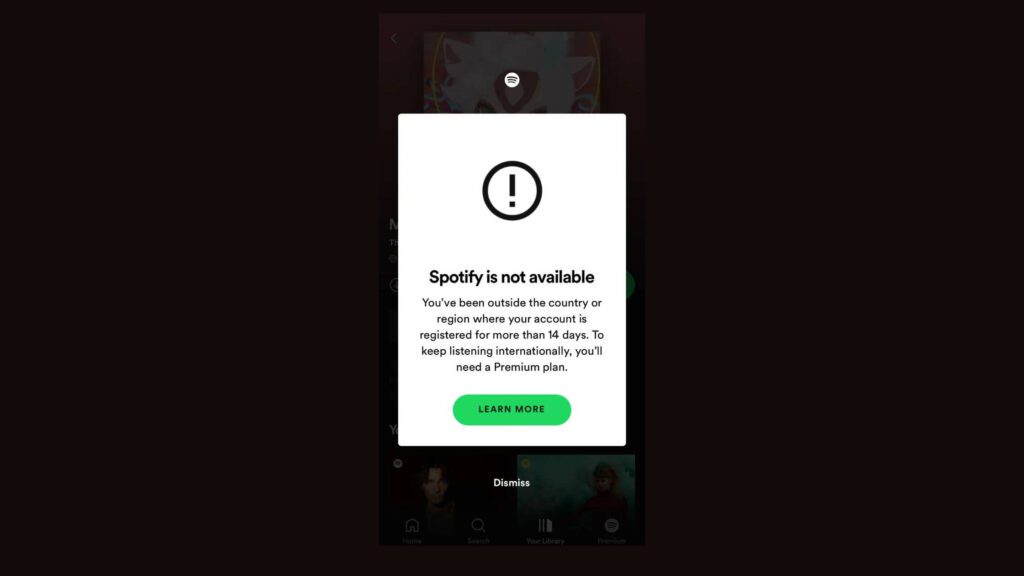
- Content Licensing Agreements: Music rights vary by country, meaning Spotify must secure separate agreements for each region. If an agreement isn’t in place, content remains unavailable.
- Government Regulations and Censorship: Certain countries, such as China, Sudan, North Korea, and Venezuela, impose strict internet controls or outright block international streaming services, preventing Spotify from operating.
- Business Strategy and Market Viability: Spotify may choose not to launch in some regions if the market demand is low or if legal and operational complexities make it economically unfeasible.
[Image: World map highlighting regions with Spotify restrictions]
Key Approaches to Alter Your Spotify Country
There are primarily two ways to change country in Spotify remotely without being physically present: manually updating your account details, which often requires a local payment method, or utilizing a Virtual Private Network (VPN) to mask your location virtually.
Method 1: Manually Updating Your Spotify Country Settings
This method is most effective if you have access to a payment method from the desired country or if you’re a free user temporarily residing elsewhere.
For Spotify Premium Subscribers
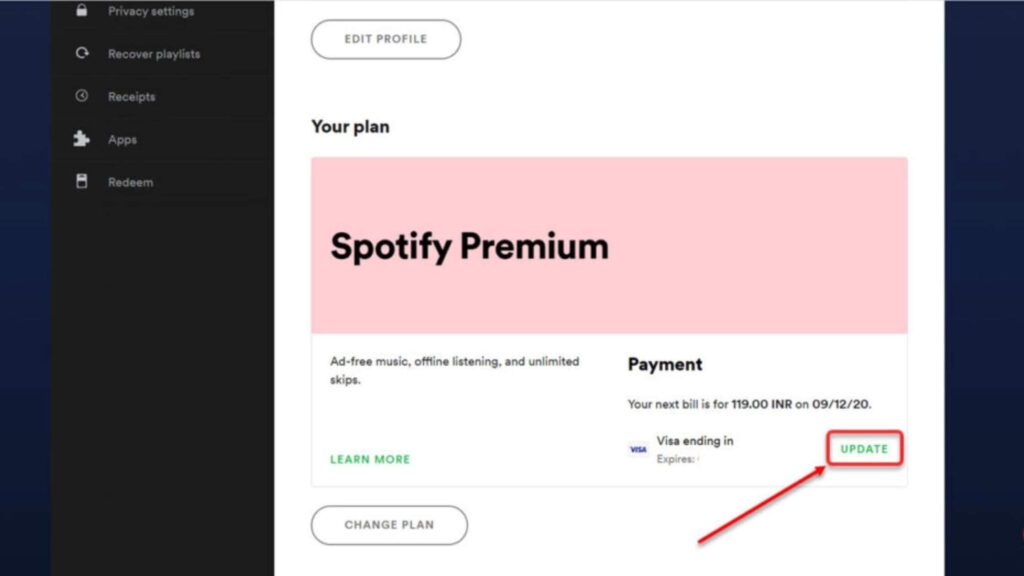
If you’re a Premium subscriber, changing your country involves updating your payment details to reflect the new region. This is because your subscription is billed in the local currency of your registered country.
- Step 1: Access Your Account: Log into your Spotify account via the official website’s account page.
- Step 2: Locate Payment Information: Under the “Account” section, find your current payment method and click “Update” next to it.
- Step 3: Enter New Payment Details: Provide a new payment method (e.g., credit card, PayPal) that is issued in the country you wish to switch to.
- Step 4: Confirm Changes: The country change will typically take effect on your next billing date, aligning your account with the new region.
[Image: Screenshot of Spotify account page with “Update” payment method button highlighted]
For Spotify Free Users
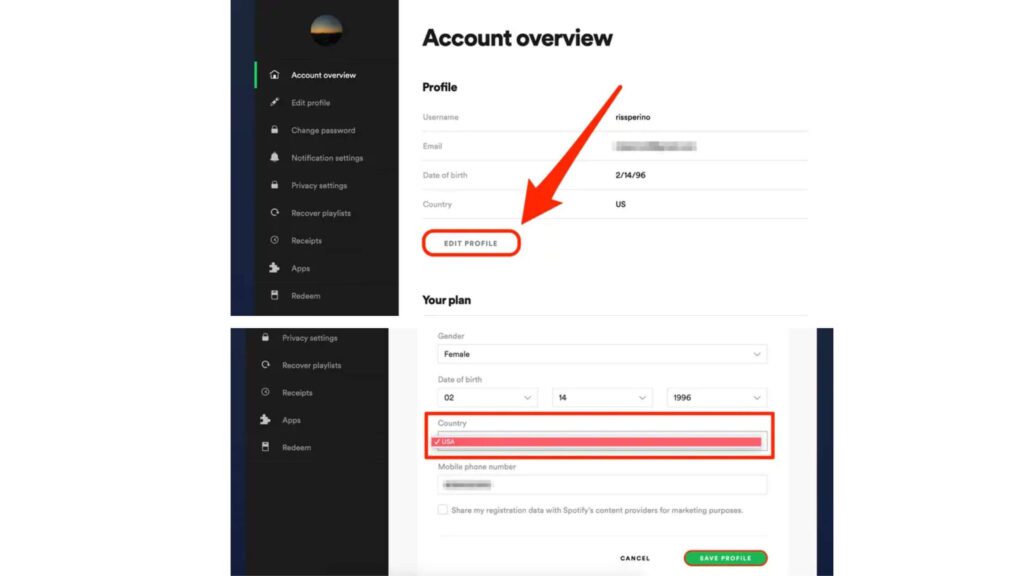
Free users have a bit more flexibility initially, being able to stream for up to 14 days in a different country without any account changes. To extend this or permanently switch, manual adjustment is needed, although it often assumes you are *physically* in the new location for a sustained period.
- Step 1: Log Into Your Account: Visit the Spotify account page and sign in.
- Step 2: Edit Profile: Navigate to your account settings and click on “EDIT PROFILE.”
- Step 3: Select New Country: Scroll down to the “Country or Region” dropdown menu and choose your desired country.
- Step 4: Save Changes: Click “SAVE PROFILE” to finalize the update.
Method 2: Using a Virtual Private Network (VPN) for Spotify
A VPN is an excellent tool for bypassing geo-restrictions by masking your actual IP address and routing your internet connection through a server in a different country. This makes Spotify believe you are located in the VPN server’s region, granting you access to its local content library.
Benefits of Using a VPN for Spotify
Beyond changing your region, a VPN offers several advantages for Spotify users, including enhanced online privacy and security. It allows you to explore music not available in your home country due to licensing, and helps maintain consistent access even when traveling through restricted zones. Always opt for a VPN with stable speeds to ensure uninterrupted streaming.
Troubleshooting: When You Can’t Change Your Spotify Region
Encountering issues while trying to change your Spotify country is not uncommon. Here are some frequent obstacles and potential solutions.
Common Roadblocks and Solutions
- Payment Method Mismatch: Spotify strictly requires that your Premium payment method is issued in the same country you’re trying to set your account to. If this doesn’t match, the change will be denied. Ensure your payment details align with the target country.
- Geographical Location for Free Accounts: For free accounts, Spotify often expects you to be physically present in the new country to make a lasting change to your region settings. Without a VPN, this can be a limitation.
- Unreliable VPN Connections: If your VPN connection is unstable or detected by Spotify, it might not successfully bypass geo-restrictions. Try connecting to a different server location or switching to a more reputable VPN service.
Conclusion
Change Country in Spotify remotely without being physically present is entirely achievable with the right approach. Whether you choose to update your account manually through a local payment method for Premium, adjust your profile as a free user (often with VPN assistance), you can unlock Spotify’s vast musical universe from anywhere. You’re now equipped to enjoy your personalized playlists and discover new content, no matter where your journey takes you.
FAQs
Can I change my Spotify region?
Yes, you absolutely can change your Spotify region. This can be accomplished by updating your Premium account’s payment method to one from the desired country. Alternatively, a Virtual Private Network (VPN) offers a flexible way to virtually switch your region, making it appear as though you’re browsing from a different location.
What issues might prevent a Spotify country change?
Common obstacles include a mismatch between your payment method’s country of issuance and your desired Spotify region, as Spotify requires these to align for Premium users. For free accounts, the platform might expect you to be physically present in the new country for the change to stick. Additionally, using an unreliable VPN could lead to connection issues that prevent successful region alteration.
What happens to my Spotify account if I move internationally?
If you move to a new country, Spotify will typically prompt you to update your account’s country settings. For Premium users, this means linking a payment method from your new country. Your playlists, saved music, and general account history will remain intact, but the availability of specific content might change due to regional licensing differences.