

Feeling overwhelmed by endless scrolls, notifications, or just ready for a digital detox? Many people search how do I delete my Instagram account when they want a clean break from the platform. Whether burnout hits or you simply prefer offline life, permanently deleting your account removes your profile, photos, videos, comments, likes, and followers for good.
Important note: Deletion differs from deactivation—deletion is irreversible after a grace period, while deactivation hides everything temporarily. If you’re sure about this step, follow the guide below.
Why People Ask: How to Delete Instagram Account?
Searches for how do I delete my Instagram account spike as users grapple with mounting concerns in 2026. Top reasons include privacy worries—Meta’s data collection, targeted ads, location tracking, and past breaches make many feel exposed. Mental health plays a huge role too: constant social comparison, curated “perfect” lives, FOMO, cyberbullying, and endless scrolling fuel anxiety, low self-esteem, depression, and sleep issues, especially among younger users.
Others seek a productivity boost or digital detox, reclaiming hours lost to mindless feeds for real-life hobbies, relationships, work, or offline focus. Shifting priorities—like stronger in-person connections or reduced screen addiction—also drive decisions.
Permanent deletion erases your entire presence (profile, posts, messages, followers) for a clean break, unlike deactivation, which hides everything temporarily and allows easy return by logging in.
Deletion vs. Deactivation: Know the Difference Before You Act
How do I delete my Instagram account permanently? First, understand the options.
- Permanent deletion erases everything after about 30 days (with possible backups up to 90 days for technical/legal reasons). You can’t recover the account.
- Deactivation hides your profile temporarily—posts vanish from view, but everything stays intact for reactivation.
Choose deletion only if you’re certain. Many start with deactivation to test the waters.
Step-by-Step: How to Delete Your Instagram Account Permanently
Instagram routes deletion through Accounts Center (Meta’s unified settings). You can do this on the app or a web browser.
- Open the Instagram app or go to instagram.com and log in.
- Tap your profile picture (bottom right), then tap the menu (three lines or More in some views).
- Select Settings (often near the bottom).
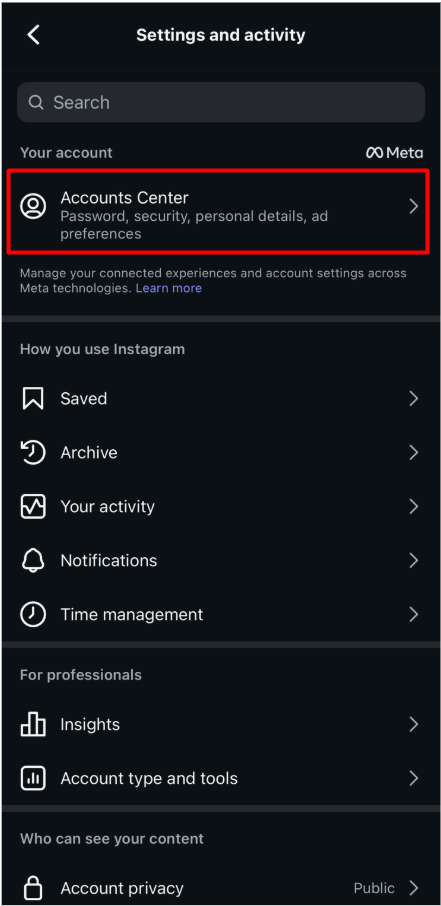
- Tap Accounts Center (usually at the top).
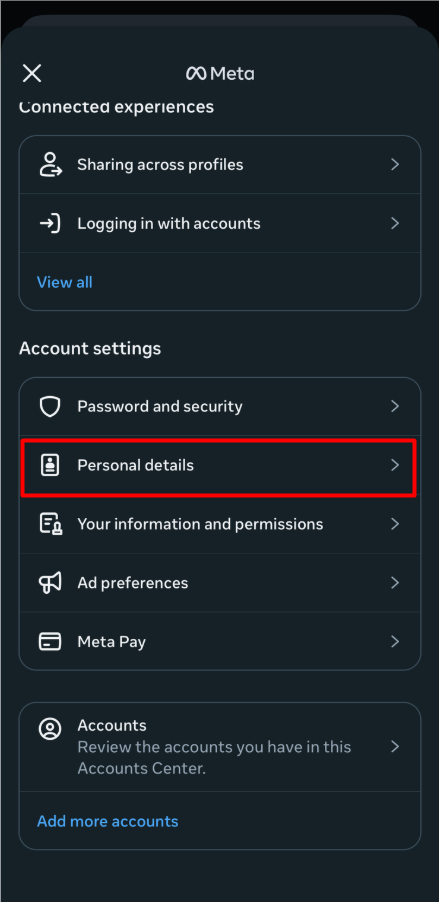
- Choose Personal details
- Tap Account ownership and control.

- Tap Deactivation or deletion.

- Select your Instagram account from the list.
- Choose Delete account (not Deactivate), then tap Continue.

- Select a reason for leaving, re-enter your password, and confirm.
Your account immediately becomes invisible to others, but Instagram starts the 30-day deletion countdown. Log back in during this window to cancel and restore everything. After 30 days, it’s gone forever—though full backend purge may take up to 90 days.
Pro tips: Use a desktop browser if the app interface feels clunky. Clear your cache afterward for peace of mind. If you’ve forgotten your password, reset it first via email/phone.
What Happens After You Delete Your Account
Once the 30-day window ends, Instagram permanently removes your profile and content. You can’t retrieve anything, and followers lose access to your old posts.
- Username may become available again (unless someone claims it first).
- If Instagram removed your account for policy violations earlier, you might not reuse the username.
- Backups may linger up to 90 days for recovery or legal purposes, but you won’t access them.
Many users feel liberated after deletion—more time for hobbies, better focus, and less comparison anxiety.
Alternatives to Permanent Deletion: Less Drastic Ways to Reclaim Control
Not ready for full deletion? Many users find relief through these lighter alternatives before (or instead of) searching how do I delete my Instagram account:
- Strengthen privacy settings — Switch to a private account, limit story viewers, disable location tags, turn off activity status, and restrict comments/DMs from non-followers. This reduces exposure without losing your profile.
- Use built-in wellness tools — Enable “Take a Break” reminders (set daily/weekly limits), mute notifications, hide like counts, or unfollow/mute accounts that trigger negativity. These curb addictive scrolling.
- Limit usage via device features — On iOS/Android, set app time limits, use grayscale mode to make the app less appealing, or move the icon off your home screen.
- Explore better alternatives — Switch to privacy-focused platforms like Mastodon, Pixelfed (photo-sharing), or BeReal (authentic moments without filters). Or go analog: photo journals, group chats, or local hobby communities.
- Partial cleanups — Archive old posts, delete stories, unfollow toxic accounts, or create a secondary “burner” account for casual browsing while keeping your main one minimal.
These steps often resolve 80% of issues—privacy fears, mental drain, or time waste—without the finality of deletion. Additionally, any connected account to your Instagram can be delete seperately from it (eg. delete Threads account without affecting Instagram account).
Final Thoughts
Deciding how do I delete my Instagram account is a personal choice that can lead to more peace, focus, and real-world connection. Whether you choose permanent deletion, deactivation, or simply tighter boundaries, the key is reclaiming your time and mental space.
Many who take this step never look back, discovering richer offline experiences they didn’t know they were missing. Reflect on your reasons, back up what matters, and move forward intentionally.
FAQs
Can I reactivate my account after permanent deletion?
No, permanent deletion is irreversible after the 30-day grace period. During those 30 days, simply log back in to cancel the request and restore everything. After that, your data vanishes forever, so consider deactivation first if you’re unsure.
How long does it take for Instagram to fully delete my account?
Instagram initiates deletion after your request, but the account becomes permanently inaccessible after 30 days. Full removal (including backups) can take up to 90 days for technical, legal, or safety reasons. During the initial 30 days, your content stays hidden but subject to Instagram’s rules.
What’s the main difference between deactivating and deleting my Instagram account?
Deactivation hides your profile temporarily and lets you return by logging in—your data stays safe. Deletion permanently erases everything after 30 days with no recovery option. Use deactivation for a break; choose deletion when you want a complete exit.