

Instagram First Draft is an automatic rough-cut tool that trims clips, removes pauses, and assembles footage into an editable Reel. After testing it on multiple types of content—from talking-head videos to daily-life montages—the feature excels at basic cleanup but leaves most creative decisions to you. It works best when your footage is already in the right order and simply needs tightening, making it a useful starting point rather than a complete editing solution.
What Is Instagram First Draft and How Does It Work?
Instagram First Draft is a new automatic editing feature for Reels that launched in September 2026 for iPhone users. According to Instagram’s official documentation, the tool analyzes selected video clips, identifies useful sections, cuts pauses, and assembles the remaining footage into a rough edit that opens in Instagram’s standard Reels editor.
The feature is designed as a starting point rather than a finished product. You can review the automatically generated sequence, adjust individual clips, remove unwanted sections, and continue editing before publishing. This distinguishes First Draft from traditional Instagram drafts, which are simply saved posts you can return to later.
Importantly, Instagram has stated that First Draft does not use AI. This means it operates using rule-based trimming and pause detection rather than analyzing content for narrative structure or strategic highlight selection. That technical distinction explains both its strengths and limitations, which became clear during hands-on testing.
Is Instagram First Draft Available on Android?
As of September 2026, First Draft is rolling out exclusively on iPhone. Instagram has not announced an Android release date, though the feature may expand to additional platforms based on user adoption and feedback.
How Do You Use Instagram First Draft to Edit Reels?
To use Instagram First Draft, open the Instagram app and create a new Reel. Select multiple videos from your iPhone camera roll or record new footage directly in the app. Once you’ve chosen your clips, tap the First Draft button at the bottom of the screen.
Instagram will analyze the footage, trim individual clips, and remove pauses or less useful sections. This process typically takes only a few seconds. The result appears as a standard Reel timeline, where you can review each cut, adjust timing, reorder clips, or remove sections entirely.
Once you’re satisfied with the edit, you can add music, text, stickers, and other creative elements before posting. If you want to remove music from an Instagram post after publishing, Instagram offers tools for that as well.
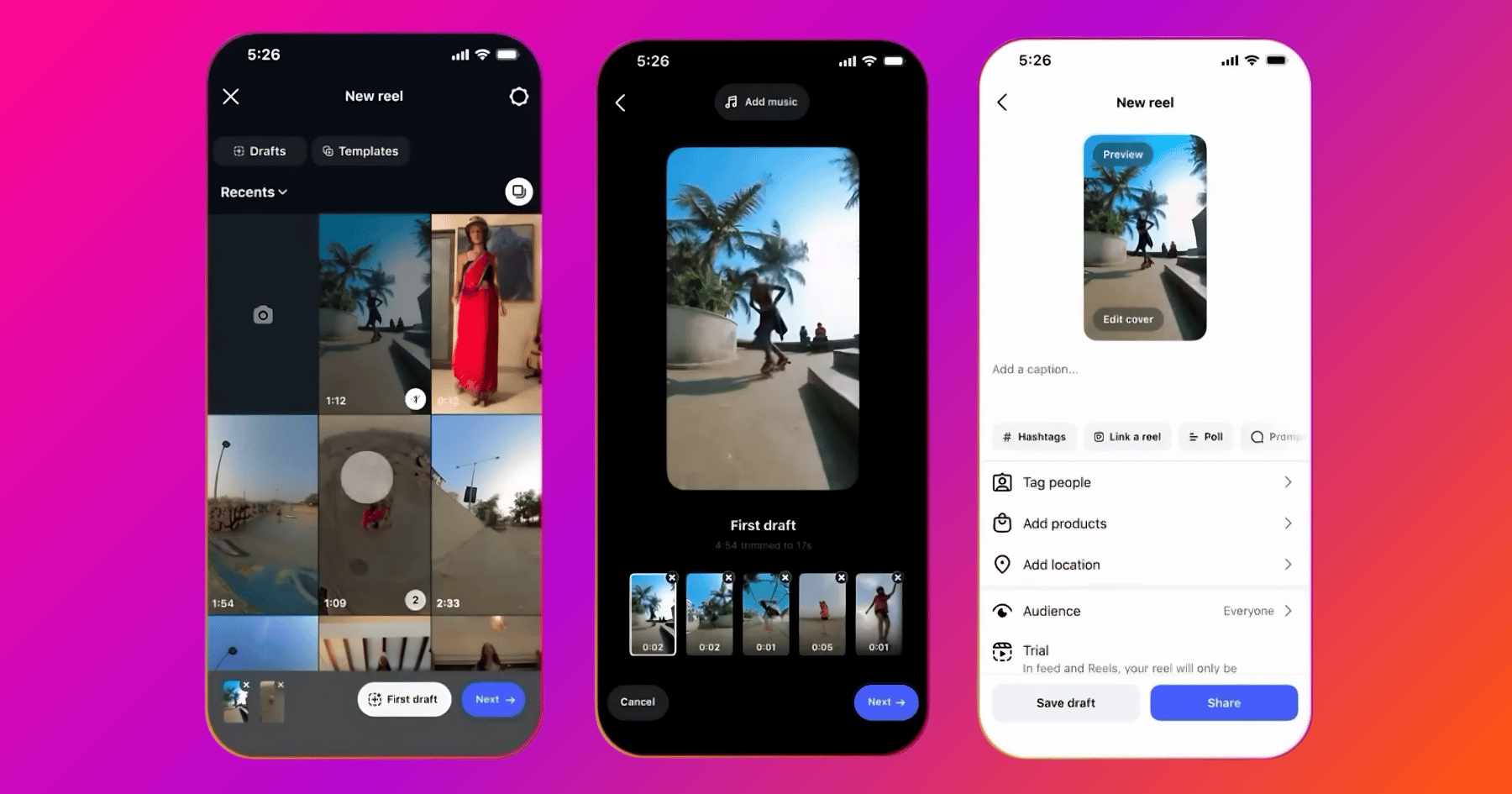
First Draft does not lock you into its decisions. The automatically generated edit is fully editable, so you maintain complete control over the final Reel. This flexibility makes it useful for creators who want to skip the tedious initial trimming phase but still refine the edit themselves.
Is Instagram First Draft Good for Different Types of Reels?
Instagram First Draft performs differently depending on the type of content you’re editing. Here’s how it handles the most common Reel formats based on testing results.
Talking-Head Videos
First Draft is particularly useful for talking-head footage when your goal is preserving the full recording while making delivery tighter. In testing, it removed pauses without substantially cutting content itself, reducing a 3:43 recording to 3:11 while retaining all spoken ideas.
However, if you want to extract a short set of highlights from a much longer recording, First Draft does not make those higher-level content selections. You’ll need to identify and trim to the strongest moments manually or use an editor designed for highlight extraction.
Montages and B-Roll Sequences
First Draft can identify useful portions of daily-life footage and sometimes finds particularly strong individual moments. However, it frequently divides clips into two or three very short segments, which can make the overall montage choppier than preferred.
For fast, energetic edits, that aggressive trimming occasionally works well. For footage where action benefits from playing out continuously—such as cooking processes or environmental transitions—you may need to restore longer sections manually. According to Later’s Instagram Reels best practices, montages perform best when individual clips last between 1.5 and 3 seconds, which aligns with First Draft’s typical output length.
Tutorial and Educational Content
For step-by-step tutorials where every instruction matters, First Draft’s conservative approach to content preservation works well. It tightens pacing without removing substance, which is exactly what educational content requires.
The limitation is that First Draft won’t help you identify which steps are most important or restructure a tutorial into a more logical sequence. If your raw footage covers steps out of order or includes tangential explanations, you’ll need to reorganize that manually.
Story-Driven or Narrative Content
First Draft showed minimal ability to recognize or reconstruct narrative structure in testing. When provided with footage deliberately supplied out of chronological order, it preserved that order while trimming individual clips.
For travel videos, day-in-the-life content, or any footage captured opportunistically rather than in final story order, you should expect to handle sequencing yourself. Research from Social Media Examiner indicates that narrative structure is one of the strongest predictors of Reel completion rates, making manual sequencing an important step First Draft doesn’t address.
What Are the Limitations of Instagram First Draft?
While Instagram First Draft removes friction from the initial editing phase, several limitations became clear during testing. Understanding these constraints helps set realistic expectations about what the feature can accomplish.
No Creative Direction or Prompts
Unlike AI editors that accept creative instructions, First Draft operates the same way regardless of your intended outcome. Whether you’re making a 15-second highlight reel or a 90-second tutorial, it applies the same trimming logic without adapting to your goals.
This means you can’t tell First Draft to “create an energetic montage” or “focus on the most important tips.” It will trim pauses and shorten clips, but the creative vision remains entirely your responsibility.
Inconsistent Highlight Selection
First Draft occasionally identified strong individual moments in montage footage, but the quality of those selections varied significantly across different clips. Some cuts preserved the most visually interesting action, while others split useful moments into fragments or kept less compelling sections.
This inconsistency means you should plan to review every clip First Draft selects rather than trusting its judgment across the entire edit. According to Buffer’s analysis of the Instagram Reels algorithm, the first three seconds of a Reel are critical for retention, making manual review of opening clips especially important.
No Reordering or Narrative Structure
First Draft does not reorganize footage to create a clearer story or logical progression. If you provide clips out of order—whether accidentally or because you captured footage opportunistically—First Draft will trim each clip individually but leave them in the sequence you provided.
For content types where narrative flow matters, this limitation means you’ll need to manually arrange clips into the right order before or after using First Draft.
Limited Control Over Aggressiveness
First Draft does not offer settings to control how aggressively it trims footage. Some creators may prefer longer, more continuous shots, while others want rapid cuts. First Draft applies its own logic without allowing you to adjust its behavior.
In testing, this resulted in some clips being cut more aggressively than I preferred, requiring me to extend sections manually to restore continuity.

Should You Use Instagram First Draft for Your Reels?
Instagram First Draft is worth using if you treat it as a rough-cut tool rather than an editor that will figure out the Reel for you. It excels when the important editorial decisions have already been made—when your footage contains the right material, is already in a sensible order, and mainly needs pauses or excess frames removed.
First Draft is most valuable for creators who already make Reels entirely inside Instagram and want to remove the friction of manually trimming every clip. If it saves ten minutes of repetitive work on a video that otherwise needs minimal editorial direction, it has accomplished its purpose.
However, First Draft becomes less useful when footage still requires editorial direction. It won’t turn a longer recording into a concise highlight reel, won’t restructure scrambled footage into a logical sequence, and won’t make strategic decisions about which content is most important.
For creators who need those capabilities, dedicated AI video editors that accept creative prompts and make higher-level structural decisions will deliver better results with less manual intervention. The choice between First Draft and more sophisticated tools depends on how much creative direction your raw footage requires before it’s ready to publish.
Regardless of which editing approach you choose, combining quality content with strategies to boost initial visibility helps new Reels gain traction faster in Instagram’s algorithm.
Frequently Asked Questions
1. Is Instagram First Draft AI-powered?
No. Instagram has stated that First Draft is not AI-powered. Unlike AI editors that work from creative prompts or instructions, First Draft uses rule-based trimming and pause detection without analyzing content for narrative structure or strategic highlight selection.
2. Does Instagram First Draft remove silences and pauses?
Yes. Silence and pause removal was one of the clearest behaviors in testing. A 3:43 talking-head recording was reduced to 3:11 after First Draft tightened pauses while retaining essentially all spoken content.
3. Does Instagram First Draft find highlights automatically?
Not reliably in the way a dedicated highlight editor would. First Draft occasionally selected strong individual moments in short montage footage, but it did not substantially condense longer recordings around their strongest ideas. If you want to turn several minutes of footage into a 30- or 60-second highlight Reel, you should expect to make those selections yourself.
4. Does Instagram First Draft reorder clips into a better sequence?
No. In testing, First Draft largely preserved the order clips were provided, even when footage was deliberately supplied out of chronological sequence. It trims individual clips but does not reorganize them into a clearer narrative structure.