

Facebook stands as a powerhouse for connecting businesses with customers, facilitating vast e-commerce interactions daily. However, this bustling digital marketplace is often plagued by spam comments, which can severely disrupt genuine customer engagement. This comprehensive guide will explore the nature of Facebook spam and provide practical, step-by-step methods to effectively block unwanted comments, ensuring a cleaner and more productive online environment for your brand.
What Are Spam Comments?
Spam comments on Facebook are intrusive, irrelevant, or deceptive messages that clutter the comment sections of your posts, ads, and group discussions. These comments are typically generated by automated bots controlled by spammers, designed to exploit information, damage reputations, or promote illegitimate interests. Recognizing the various forms and objectives of these unsolicited messages is crucial for implementing effective prevention strategies and protecting your brand’s integrity on the platform.
Common Types of Spam
To effectively combat spam, it’s important to identify its different forms:
- Unbranded Advertisements: These comments promote products or services completely unrelated to your content. Spammers use your audience for free exposure, diverting attention from your legitimate discussions. For instance, if you share a healthy recipe, a spam comment might aggressively push an unrelated financial scheme or weight-loss product.
- Fake Interactions: Often automated and generic, these comments mimic real engagement but lack genuine context. They might use phrases like “Great post!” or “Amazing content!” without any specific reference to your topic, making them seem authentic at first glance but revealing their spam nature upon closer inspection.
- Links and Clickbait: Perhaps the most dangerous type, these comments contain tempting links designed to lure users into clicking. While appearing harmless, these links can lead to malicious websites, phishing scams, adult content, or financial fraud, aiming to steal personal information or infect devices.
The Dangers Of Spam Comments
The presence of spam comments extends beyond mere annoyance; it significantly impacts your brand’s online presence and reputation. Unchecked spam can erode trust, diminish user experience, and even pose security risks. Understanding these consequences highlights why active spam management is not just a best practice, but a necessity.
Negative User Experience
When comment sections are overwhelmed with irrelevant or offensive spam, it becomes difficult for genuine customers to find and participate in meaningful conversations. This clutter creates a barrier between your brand and its audience, hindering authentic engagement and making potential customers feel discouraged from interacting.
Damaged Brand Reputation
A consistent flow of spam comments can make your brand appear unprofessional or poorly managed. This lack of moderation signals to potential customers that you might not prioritize maintaining a clean and trustworthy online space, which can deter them and compel them to seek alternatives.
Decreased User Interaction and Reach
Facebook’s algorithm favors content with high, meaningful user engagement, which helps in recommending your posts to relevant audiences. Spam comments, however, dilute genuine engagement, making your content appear less appealing. When users see cluttered comment sections, they are less likely to participate, ultimately lowering your content’s visibility and potential lead generation.
Security Risks
Some spam comments contain harmful links designed to steal personal information, deploy malware, or redirect users to deceptive phishing sites. These risks can compromise your audience’s security and, by extension, your brand’s credibility.
Wasted Time and Resources
Manually sifting through and removing spam comments can be a time-consuming task, especially for pages or groups with large followings. This diversion of resources away from core business activities can be costly and inefficient.
Effective Ways to Block Spam on Facebook
Facebook offers built-in tools to help you manage and filter comments across your personal profile, business pages, and groups. Implementing these settings can significantly reduce the amount of spam you encounter.
For Personal Posts
You can control who comments on your personal Facebook posts, limiting spam by restricting visibility to your trusted connections.
1. Open your Facebook account and navigate to your profile by clicking your profile picture in the top right corner.

2. Locate the specific post you wish to manage.
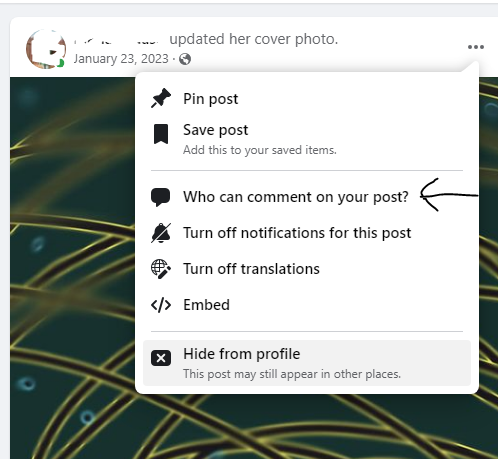
3. Click the three dots (…) in the top right corner of the post to access its settings.
4. Select “Who can comment on your post?” from the options.
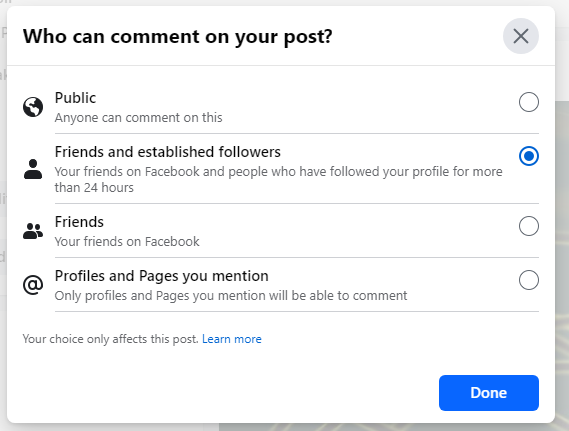
5. Choose “Friends and Established followers.” This setting ensures that only people you are friends with, or those who have followed you for at least 24 hours, can comment, effectively filtering out many spam bots.
For Facebook Pages
Facebook Pages offer more robust moderation tools, allowing you to filter comments by keywords, phrases, and even geographical regions.
1. Switch to your Facebook Page profile.
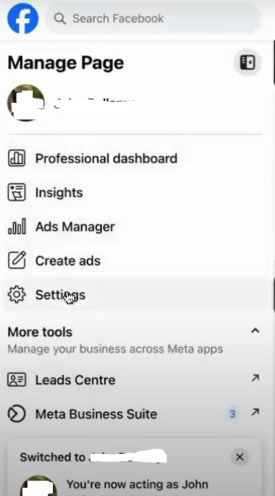
2. Go to your Page’s “Settings.”
3. From the left-hand menu, select “Privacy.”
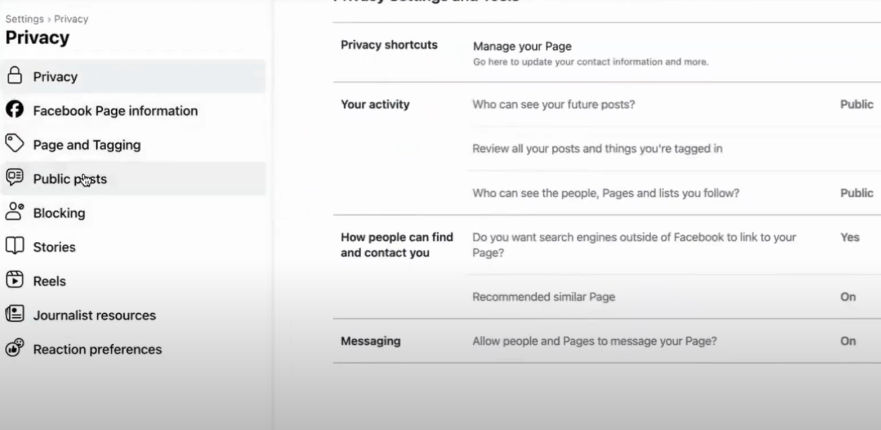
4. Within the Privacy section, click on “Public Posts.”
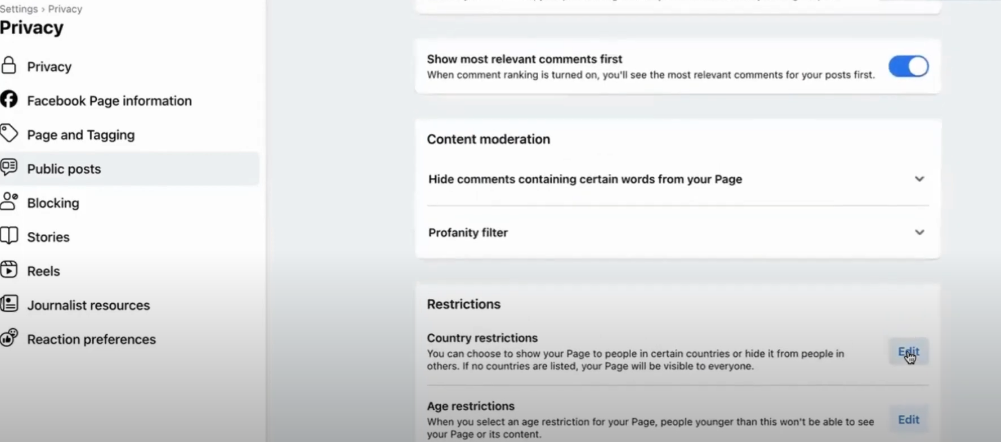
5. Scroll down to the “Content Moderation” section. Here you’ll find various options, including “Country Restrictions.” Click “Edit.”
6. Add country names from which you want to hide comments. This can be useful if you notice a high volume of spam originating from specific regions.
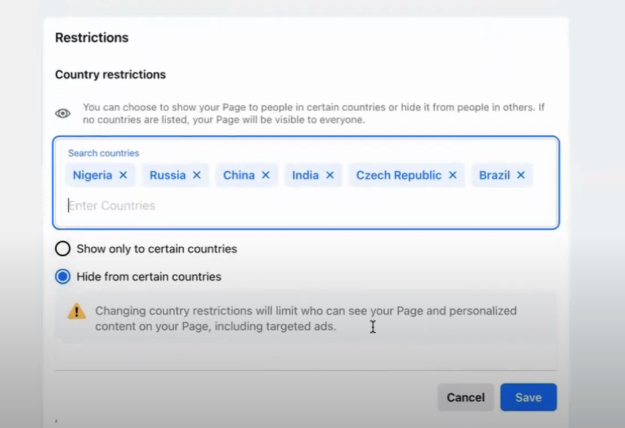
7. Select “Hide from certain countries” and click “Save.”
For Facebook Group Posts
As a group admin or even a regular member, you can manage commenting permissions on individual posts within a Facebook group.
1. Open the Facebook group and locate the specific post you want to manage.
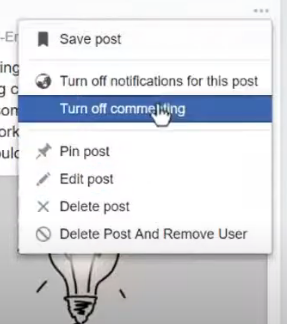
2. Click on the three dots (…) in the top right corner of the post.

3. From the dropdown list that appears, select “Turn off commenting” to prevent any further comments on that particular post.
Conclusion
Maintaining a clean and engaging Facebook presence is vital for any brand or individual. By actively implementing the strategies outlined above, you can significantly reduce the influx of spam comments, fostering a more positive and secure online environment. While Facebook provides essential tools for moderation and filtering, consider exploring advanced privacy management solutions for an enhanced layer of security and vigilance. Taking proactive steps ensures your comment sections remain spaces for authentic connection, free from unwanted clutter and potential threats.
Frequently Asked Questions (FAQs)
How can I report a spam comment on Facebook?
To report a spam comment, locate the comment and click on the three dots in its upper right corner. From the options, select “Report” and then choose “Spam or misleading content.” Facebook will review the report based on its community standards.
What generates spam comments on Facebook?
Spam comments on Facebook are primarily generated by automated bot activity. Spammers deploy these bots to lure users into various schemes, such as data harvesting, phishing scams, or promoting their illegitimate interests, often at the expense of a company’s reputation.
What happens after I report a comment to Facebook?
Once you report content to Facebook, their moderation team will review it to determine if it violates their community standards. If a violation is found, Facebook will take appropriate action, which may include hiding or completely removing the offending comment, photo, or post from the platform.
Can I prevent all spam comments on Facebook?
While it’s challenging to prevent every single spam comment, implementing the moderation strategies discussed in this article can significantly reduce their presence. Combining Facebook’s built-in tools with proactive monitoring can help you maintain a much cleaner comment section.
Why is it important to manage spam comments?
Managing spam comments is crucial for maintaining a positive user experience, protecting your brand’s reputation, and fostering genuine engagement. Spam can deter real users, compromise security, and waste valuable time and resources that could be better spent on other business activities.